| 1. |
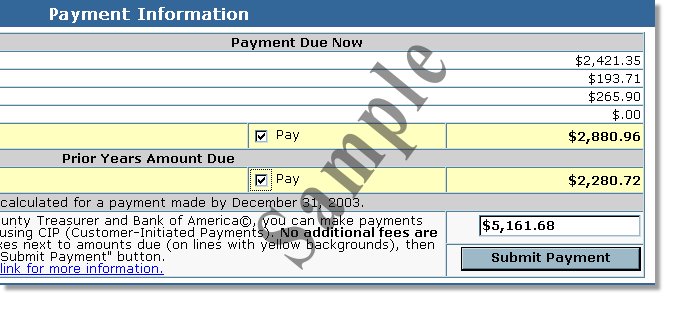
Ensure that you have selected the correct property number and the amount to be paid. |
| 2. |
Click on the "Submit Payment" in the Payment Information section of the tax statement page. |
| |
 |
| 3. |
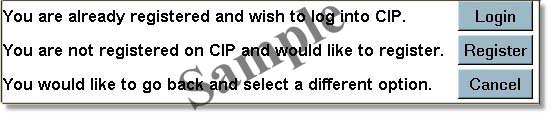
Verify the property information on the "Prepare Payment Submission" page, and click on "Submit Payment". You will be directed to the CIP login page. |
| |
 |
| 4. |
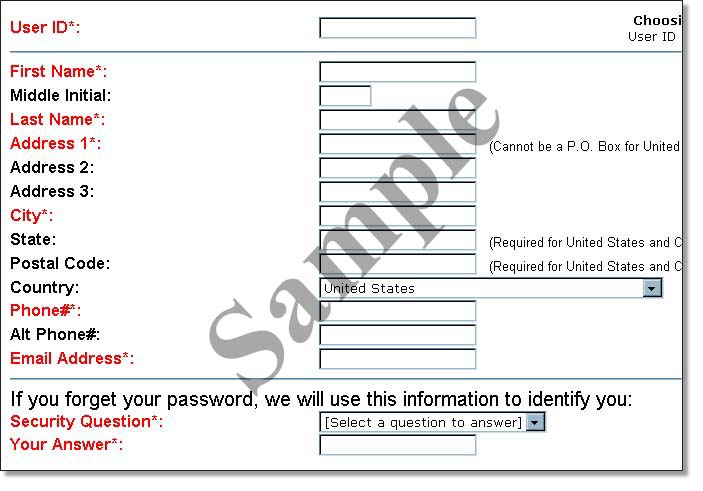
Unless you are a returning CIP customer, click on REGISTER. You will be presented with a page requesting personal information: |
| |
 |
| 5. |
Fill in the basic information as requested, including a unique user ID. After clicking the submit button, you will be presented with a login screen. If you plan to conclude the payment process right away, leave the login screen displayed. Within a few minutes, you will receive a temporary password at the e-mail address you supplied. You will use it in the next step. |
| 6. |
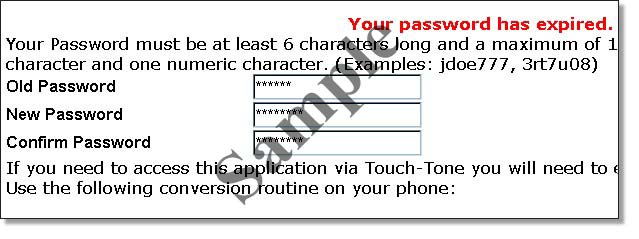
Log back in to the CIP site with the temporary password. If your login is successful, you will be informed that your temporary password has expired, and asked to supply a new permanent password. Click SUBMIT after supplying your temporary and permanent passwords in their respective boxes. |
| |
 |
| 7. |
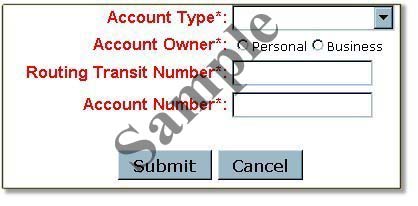
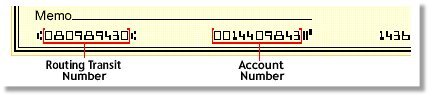
You will now be asked to enter your bank account information, including your account and routing numbers. It would be helpful to have a copy of one of your checks handy before reaching this stage. Click SUBMIT after completing the boxes. |
| |
 |
| |
 |
| 8. |
Next, you will see a recap of all the information relevant to your transaction, including:
- the property number,
- the taxpayer name,
- the amount being paid,
- and the bank account just entered.
|
| 9. |
When you are satisfied the information displayed is correct, and you want to continue with the payment transaction, click SUBMIT. |
| 10. |
You will then be presented with the Payment Confirmation page. We recommend you print or in some other way record this information: it will be important should questions arise about the transaction. |
| 11. |
Finally, you will see a page indicating the County has received payment confirmation from CIP. Please remember that although your payment and the date it was made will have been recorded, it may take up to 3 business days to be reflected in an online query of your property taxes. |
| |
| |
